


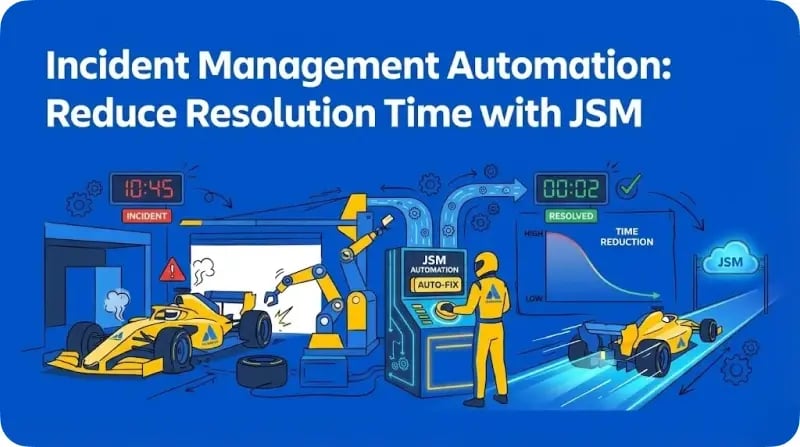
Every minute of downtime costs organisations money and customer trust. According to the Atlassian 2025 State of Incident Management Report, 79% of teams are already using AI for incident trending, and 86% track Mean Time to Resolution (MTTR) as their primary performance indicator.
Jira Service Management provides built-in automation capabilities that help IT teams detect, respond to, and resolve incidents faster. This guide covers practical automation strategies you can implement today. For broader context on how AI is reshaping service management, see our pillar article on ITSM trends in 2026.
Understanding Incident Management Metrics
Before automating, you need to understand what you're measuring.
The Four MTTRs
MTTR can mean different things depending on context. According to Atlassian's incident metrics guide, the "R" can stand for:
- Mean Time to Respond: Time from alert to first human acknowledgment
- Mean Time to Repair: Time spent actively fixing the issue
- Mean Time to Recover: Total downtime from failure to full restoration
- Mean Time to Resolve: Time to fix the issue and prevent recurrence
Most organisations track Mean Time to Recover as their primary metric because it reflects the customer's experience of downtime.
Supporting Metrics
- MTTA (Mean Time to Acknowledge): How quickly someone responds to an alert
- MTBF (Mean Time Between Failures): System reliability indicator
- MTTD (Mean Time to Detect): Time from failure occurrence to detection
Automation Strategy 1: Alert Management
Alert fatigue is real. According to Atlassian's guide on alert fatigue, overwhelming numbers of alerts desensitise the people tasked with responding to them, leading to missed or ignored alerts. The solution is intelligent alert management.
Alert Grouping and Deduplication
JSM's AIOps capabilities group related alerts automatically, reducing noise and surfacing the incidents that matter. When a server fails, you might receive dozens of alerts from different monitoring tools. Alert grouping consolidates these into a single incident, so your team focuses on resolution rather than sifting through notifications.
To configure alert grouping in JSM:
- Navigate to Settings > Operations > Alert policies
- Create grouping rules based on common attributes (service, infrastructure component, alert type)
- Set time windows for grouping related alerts
Intelligent Routing
Automation rules can route alerts to the right team based on affected services, severity, or content. A database alert goes to the DBA team. A network issue goes to infrastructure. No manual triage required.
Automation Strategy 2: On-Call Scheduling
Manual escalation wastes critical minutes during incidents. JSM's on-call management automates responder notification.
Setting Up On-Call Schedules
Create rotation schedules that ensure someone is always available. JSM supports:
- Weekly or daily rotations
- Follow-the-sun schedules for distributed teams
- Override schedules for holidays or planned absences
Escalation Policies
Define what happens when the primary responder doesn't acknowledge an alert:
- After 5 minutes: Escalate to secondary responder
- After 10 minutes: Escalate to team lead
- After 15 minutes: Page the entire team
This removes the human delay from escalation decisions. Eliminating coordination overhead is one of the most effective ways to reduce MTTR, as teams spend less time assembling responders and more time resolving the actual issue.
Automation Strategy 3: Incident Triage with Rovo
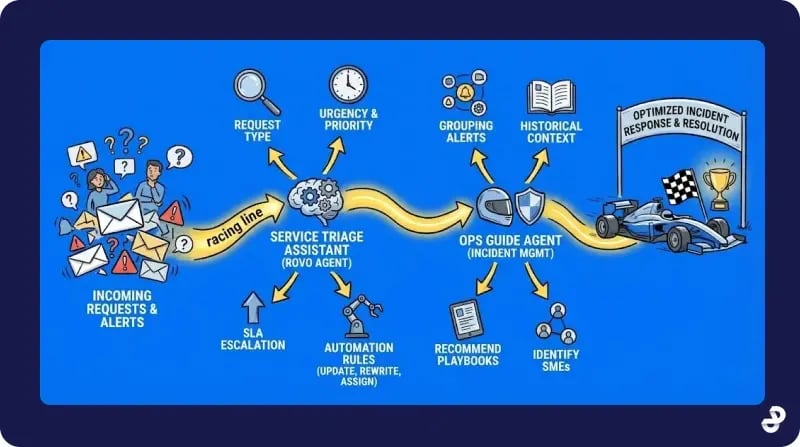
Manual ticket classification slows down response times. Rovo agents can automate triage for incoming incidents.
Service Triage Assistant
JSM includes a built-in Rovo agent called Service Triage Assistant. According to Atlassian's AI feature guide, this agent analyses incoming requests to determine:
- Request type
- Urgency and priority
- Whether escalation is needed based on SLAs
You can use the Service Triage Assistant within automation rules to instantly update ticket priorities, rewrite titles for clarity, or assign request types as incidents arrive.
Ops Guide Agent
For incident management specifically, the Ops Guide agent helps on-call responders by:
- Grouping related alerts intelligently
- Providing historical context from past incidents
- Recommending playbooks and next actions
- Identifying subject matter experts to involve
According to Atlassian's announcement, Rovo agents can surface information from third-party sources and service mappings to help identify probable root causes during an incident.
Automation Strategy 4: Automated Actions and Remediation
Some incidents can be resolved without human intervention.
Common Automated Remediation Actions
- Service restarts: Automatically restart a hung service when specific conditions are met
- Resource scaling: Trigger auto-scaling when capacity thresholds are breached
- Cache clearing: Clear caches when memory alerts fire
- Certificate renewals: Renew SSL certificates before expiration alerts trigger
Web Request Steps
JSM automation rules support web request steps that can trigger external systems. You can:
- Call APIs to restart services
- Trigger runbook automation in external tools
- Post to Slack or Teams channels
- Update status pages automatically
Implementation Approach
Start with low-risk automations where failure won't cause additional harm. Monitor results before expanding to more critical actions. Most mature IT organisations begin with service restarts and cache clears before progressing to more complex remediation workflows.
Automation Strategy 5: Post-Incident Reviews
Writing post-incident reviews (PIRs) is essential but time-consuming. AI can help.
AI-Generated PIR Drafts
Rovo can generate a first draft of your PIR by pulling data from:
- The incident timeline
- Connected alerts
- Chat communications during the incident
- Resolution notes
According to Atlassian's engineering blog, this saves hours of manual documentation work while ensuring no critical details are missed.
Automated Action Item Creation
When an incident closes, automation can:
- Create follow-up tickets for identified improvements
- Assign action items to responsible parties
- Set due dates based on priority
One Atlassian customer noted: "Jira Service Management is saving us a significant amount of time. Once an incident ticket is closed, it'll run an incident report and create action items that are tracked."
Building Your Automation Roadmap
Implementing incident automation works best in phases.
Phase 1: Foundation (Weeks 1-2)
- Configure alert integrations from your monitoring tools
- Set up on-call schedules and escalation policies
- Create basic routing rules for different incident types
- Establish SLAs for acknowledgment and resolution
Phase 2: Intelligent Triage (Weeks 3-4)
- Enable alert grouping and deduplication
- Configure the Service Triage Assistant for automated classification
- Create priority rules based on affected services and customer impact
- Set up automated notifications to stakeholders
Phase 3: Proactive Response (Weeks 5-8)
- Implement automated remediation for known issues
- Configure Rovo agents for root cause assistance
- Build runbooks for common incident types
- Enable AI-generated PIR drafts
Phase 4: Continuous Improvement (Ongoing)
- Review incident metrics monthly
- Identify recurring incidents for problem management
- Expand automation coverage based on ticket analysis
- Refine escalation policies based on performance data
Measuring Success
Track these metrics to evaluate your automation effectiveness:
MTTR Reduction: Compare resolution times before and after automation. Industry research suggests AI-driven automation can reduce incident resolution times by up to 50%.
Alert-to-Acknowledgment Time: Automated routing and on-call management should reduce MTTA significantly.
Ticket Deflection: Automated remediation should resolve some incidents without human intervention.
PIR Completion Rate: AI-generated drafts should increase the percentage of incidents with completed reviews.
Next Steps
Effective incident management automation requires both the right tools and the right processes. Start with your highest-volume incident types and expand from there.
For guidance on virtual agents that handle service requests before they become incidents, see our guide on setting up AI virtual agents in JSM. If you're evaluating JSM against other platforms, our JSM vs ServiceNow comparison covers incident management capabilities in detail.
How Design Industries Can Help
Implementing incident management automation requires expertise in both JSM configuration and operational best practices. Design Industries helps Australian organisations:
- Design on-call schedules and escalation policies
- Configure alert integrations and grouping rules
- Implement Rovo agents for automated triage
- Build automation rules for common remediation actions
- Establish metrics dashboards and reporting
Our team ensures your incident management processes reduce MTTR while keeping your responders productive and engaged.
Ready to reduce your incident resolution time? Contact us to discuss your incident management automation strategy.
Frequently Asked Questions
What JSM plan do I need for incident management automation?
Advanced incident management features including alert integrations, on-call scheduling, and Rovo agents require JSM Premium or Enterprise plans. The Premium plan starts at approximately $47-53 per agent per month and includes these capabilities.
How long does it take to see MTTR improvements?
Most organisations see measurable improvements within the first month after implementing alert grouping and on-call automation. Significant MTTR reduction typically takes two to three months as teams refine their automation rules and build comprehensive runbooks.
Can I integrate JSM with my existing monitoring tools?
Yes. JSM integrates with most major monitoring platforms including Datadog, New Relic, Splunk, Prometheus, and many others. Alert integrations push notifications directly into JSM where automation rules can process them.
What's the difference between the Ops Guide and Service Triage Assistant?
The Service Triage Assistant focuses on classifying and routing incoming requests across all types. The Ops Guide is specifically designed for incident management, helping on-call responders by surfacing relevant alerts, historical context, and recommended actions during active incidents.
Should I automate remediation for all incident types?
No. Start with well-understood, low-risk scenarios where automated actions won't cause additional harm if they fail. Service restarts and cache clears are good starting points. More complex remediation should always include human approval in the workflow.